Query fan-out is the technique AI search engines use to break a single question into several distinct internal searches, run them behind the scenes, and build one answer from the combined results. Google names it as the core retrieval mechanism of AI Mode, and ChatGPT does the same thing whenever it searches the web before answering.
One prompt fans out into several searches, each with its own wording and its own set of results. The page that gets cited is the page that matches one of those searches, not the words your customer typed. That is why fan-out quietly decides who appears in AI answers, and why it sits at the center of generative engine optimization.
Query fan-out is the core mechanism of Google AI Mode
When Google introduced AI Mode, it named this technique explicitly. Google says AI Mode works by "breaking down your question into subtopics and issuing a multitude of queries simultaneously on your behalf", or in a Googler's plainer words, "basically doing a dozen searches for you in the time it takes to do one". Those searches run across Google's index and data sources before AI Mode synthesizes a single response.
This is why an AI Mode answer routinely draws on sources that never appear on the classic results page for the original query. AI Mode is not answering one search; it is answering several searches you never see, some of them about subtopics you did not mention. A site can rank well for the visible query and still be absent from AI Mode, because the fan-out queries went somewhere else.
If Google AI Mode is a channel you care about, tracking how it answers your buyers' questions is the starting point: that is what the Google AI Mode visibility tracker is for.
ChatGPT rewrites your question into its own searches
ChatGPT rarely searches for your customer's exact words either. OpenAI's help center says ChatGPT search "typically rewrites your query into one or more targeted queries" before sending them to its search providers. The model reads whatever ranks for those rewritten queries, not for the original prompt.
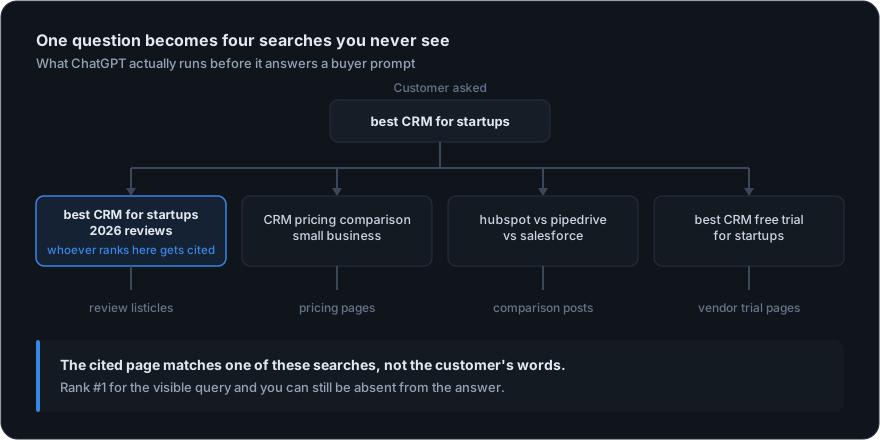
Say a buyer asks ChatGPT, "best CRM for startups." Under the hood, the model may never search that phrase at all. It might run something like this instead:
Customer asked
best CRM for startups
ChatGPT searched
- best CRM for startups 2026 reviews
- CRM pricing comparison small business
- hubspot vs pipedrive vs salesforce
- best CRM free trial for startups
One question became four searches. Each one pulls its own sources, and none of them is the phrase your customer actually typed.
Watching how often your brand survives this process, prompt by prompt, is exactly what a ChatGPT visibility tracker measures.
Why query fan-out decides whether you get cited
Here is the uncomfortable part. You can rank #1 for "best CRM for startups" and still never get mentioned, because the engine went looking for "best CRM for startups 2026 reviews" and a competitor owns that phrase. The model cites the page that matches its search, not yours.
So the keywords that decide your AI visibility are not the ones you picked. They are the ones the engine generates on the fly, every time it answers. If you cannot see them, you are optimizing blind.
You are not competing for the question your customer asked. You are competing for the questions the AI asked on their behalf.
How to see the fan-out queries behind your prompts
Until recently, the only way to read these hidden searches was to open your browser's developer tools, find the right network request, and dig through raw JSON one conversation at a time. Geonimo's Query Fan-Out feature captures them for you automatically.
For every prompt you track, it records the searches the engine issued to the web and shows them two ways:
- By query. Each unique search, how many times it was issued, how many of your prompts triggered it, and the sources it surfaced.
- By prompt. Every prompt grouped with the full set of searches the model ran to answer it.
Geonimo captures fan-out wherever an engine exposes it in its responses. Not every engine reveals its internal searches to the same degree, so coverage differs per engine and is reported in the app exactly as measured. It is the same data the manual developer-tools trick gives you, except across every prompt you track and without the digging.
How to optimize for query fan-out
Once you can see the real searches, the play is simple. Take the phrases that show up most often and put them where the engines will find them: your titles, your URL slugs, your H2s, your first sentence. Near the top of the page, not the bottom.
Recurring fan-out queries that surface only competitor content are your content roadmap: each one is a page you have not written yet, phrased in the engine's own words. Pair that with citation tracking to see which sources win those retrievals today, and you know exactly what to publish and where to earn placement.
That is the whole loop. Read the terms AI Mode and ChatGPT use to look you up, then use those exact terms before they come looking.