Tracking Google AI Overviews means answering four questions, continuously: do my queries trigger an Overview? Is my brand named in it? Which sources does it cite? And how does that compare to my competitors? You can answer them manually with a query list and a spreadsheet, or automatically with daily tracking. This guide covers both, plus the click data that makes the effort worth it.
The stakes are simple: AI Overviews now appear on a large share of the searches that used to send you traffic. When one shows up, it answers the query above the classic results, and absorbs most of the attention. Your rank tracker still says you're position 3. Your clicks say otherwise.
Why Your Rank Tracker Misses This
Classic rank tracking measures your position in the organic list. AI Overviews sit above that list and follow different rules: they are generated per-query, they change with Google's model updates, and they name a handful of brands and sources chosen by the AI, not necessarily the top-ranking pages.
Three consequences make Overview tracking its own discipline:
- Volatility. Google continuously adjusts when Overviews trigger and what they say. The same query can gain or lose an Overview week to week, and the brands inside it reshuffle with model updates.
- Selection ≠ ranking. Ranking #1 organically doesn't guarantee a citation in the Overview. Google's AI picks sources that answer the question directly, with clean structure and strong entity signals. The overlap with the top 10 is real but partial.
- Binary outcomes. There is no position 8 inside an Overview. You're named (or cited), or you're invisible. That makes presence tracking more like share-of-voice measurement than rank tracking.
The Four Metrics That Matter
1. Overview presence rate
The share of your tracked queries that trigger an AI Overview at all. This tells you how exposed your traffic is, and it usually grows every quarter.
2. Brand mention rate
Of the queries with an Overview, how often your brand is named, with position and framing. This is your visibility score for Google's AI layer.
3. Citation share
The links inside an Overview are the new position #1. Track which URLs get cited for your queries, yours and the third-party pages that win instead. (This is the same citation tracking discipline that applies on every AI engine.)
4. Competitor share of voice
Who gets named when you don't. Overview mentions are zero-sum: a competitor's gain on your money queries is your loss, and it's visible within days if you track daily. Share of voice is the honest competitive KPI here.
What the Click Data Actually Shows
The reason AI Overview tracking matters is measured, not theoretical:
- Pew Research Center tracked ~900 U.S. adults' real browsing in March 2025: when a search produced an AI summary, users clicked a traditional result on only 8% of visits, versus 15% without one, and clicked a source link inside the summary on just 1% of visits.
- Seer Interactive's study across 25M organic impressions found organic CTR fell 61% on queries showing an AI Overview. The flip side is the whole GEO business case: brands cited inside the AI Overview saw 35% more organic clicks and 91% more paid clicks than uncited brands.
- The story keeps moving: Seer's 2026 update (5.47M queries, 53 brands) measured organic CTR on AI Overview queries recovering from a 1.3% floor in December 2025 to 2.4% by February 2026. Ahrefs' independent analysis of 300,000 keywords corroborates the earlier decline.
The practical conclusion: presence in the AI Overview is worth measuring on its own, because it changes click behavior in both directions.
Method 1: Manual Tracking (Free, Limited)
The zero-budget version works like this: build a list of 20-40 queries that matter to your business, search them in a clean browser session (logged out, US location via VPN if that's your market), and record for each: Overview present yes/no, brands named, sources cited.
Do this weekly in a spreadsheet and you'll have a directionally useful picture within a month. The limitations show up quickly, though:
- Overviews are volatile and personalized: a single manual check is one sample of a distribution. You'll see changes that aren't trends and miss trends between checks.
- 40 queries weekly is an hour of tedious work that someone will stop doing by week six.
- You can't see why anything changed, no history of the Overview text, no diff of the citation list.
Method 2: Automated Daily Tracking
Purpose-built trackers query Google daily for your tracked queries, capture the full Overview (text, brands, citations), and turn it into trend lines. That solves the volatility problem: daily sampling makes real movements distinguishable from noise, and it builds the historical record that lets you diagnose changes.
Geonimo's Google AI Mode Tracker does the automated version for Google's conversational AI surface: the same prompts run daily against Google AI Mode, ChatGPT and Perplexity, with mentions, sentiment and citations extracted from each (AI Overviews coverage is on the roadmap). The cross-engine view matters more than it sounds: if you're missing from Google's AI answers but strong in ChatGPT, the problem is Google-specific (entity signals, structured data). If you're missing everywhere, it's a category authority problem. Same symptom, opposite fixes.
Suite tools (SE Ranking, Semrush) also flag Overview presence on tracked keywords. If you only need "does an Overview exist for my keywords", that's enough. If you need what it says about you, who it cites, and how to change it: you need answer-level tracking.
AI Overviews vs AI Mode vs Gemini: Know Which Surface You're Tracking
AI Overviews are one of three Google AI surfaces, and they're often conflated. AI Mode (Google's fully conversational search, a separate tab in Search) composes answers via query fan-out across dozens of hidden sub-searches, and Gemini answers as a standalone assistant app. They share Google's index and Gemini models but frequently name different brands for the same question.
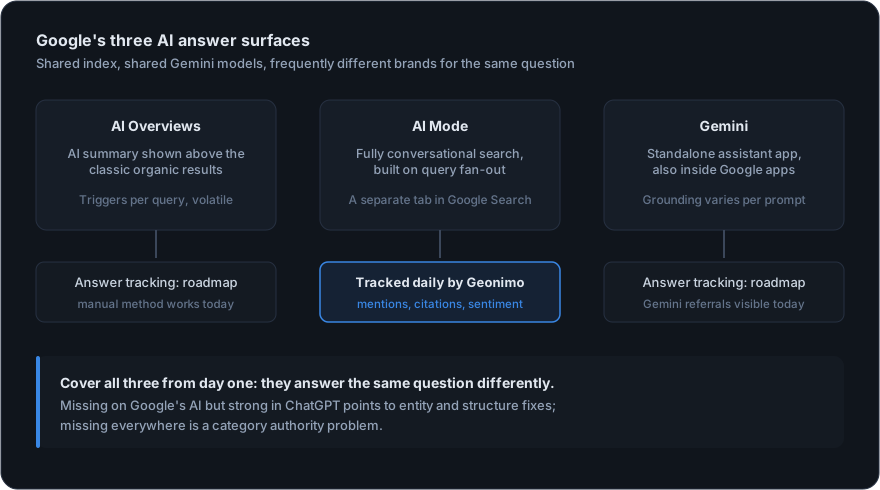
If you're setting up tracking now, cover all three from day one: manual checks for Overviews and Gemini, daily automated tracking where it exists for AI Mode. The brands that win AI Mode early are the ones covering the fan-out sub-queries (the specific questions Google generates around your category) before competitors know they exist. (More on that in our query fan-out guide.)
From Tracking to Winning
Once the tracker shows where you're missing, the fixes follow a consistent pattern:
- Answer the query directly. Put a concise, quotable answer near the top of the target page. Overviews cite passages, not pages: give Google a passage worth citing.
- Add FAQ and HowTo schema. Structured data helps Google's AI layer parse and trust your answers. Every page targeting an Overview query should carry it.
- Fix entity consistency. Same brand name, description and category across your site, LinkedIn, directories and review profiles. Inconsistent entities get skipped.
- Earn the third-party citations. Overviews often cite listicles and review sites rather than vendors. Your citation share data shows exactly which publications to target.
Then keep the loop closed: ship a fix, watch the daily trend, keep what moves the number. That measure-fix-measure cycle is the entire discipline of generative engine optimization. Overviews are just its most visible battleground.
Start Tracking Today
Pick your 20 most valuable queries and check them manually this week: that baseline alone will probably surprise you. When you're ready for daily coverage, Geonimo runs your full prompt set every day across Google AI Mode, ChatGPT and Perplexity, with first insights within 24 hours of the free audit.
Related Articles